

|
|
The option allows you to add Insurance details of statistical declaration. To access the Insurance section, click on the “Insurance” tab as illustrated in the image below.
To add insurance details
1. Open the Insurance page.(SAUDIEDI>> Statistical Declaration>> Create>> Insurance)
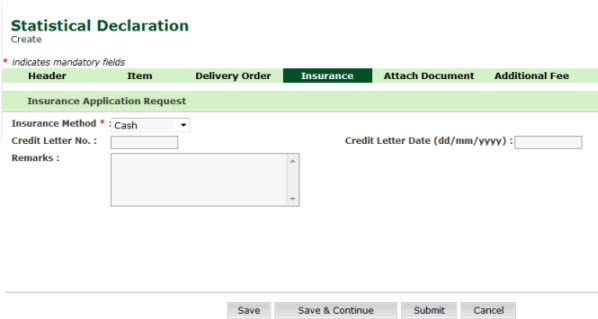
Insurance Create page
2. Enter
information in the insurance application request fields.
| Field | Description |
| Insurance Method | Select the insurance method from the drop down list (e.g., Cash, Credit Letter). |
Credit Letter No |
Enter the Credit letter number. |
Credit Letter Date |
Enter the credit letter date. |
Remarks |
Enter the remarks if any. |
Back To: Creating Statistical Declaration Details
|
| Copyright SaudiEDI - 2012 |