

|
|
|
|
|
This option allows you to search and edit the statistical declaration details in the SaudiEDI application.
To search for statistical declaration details
1. Open the Search page.(SAUDIEDI >> Statistical Declaration>> Search)
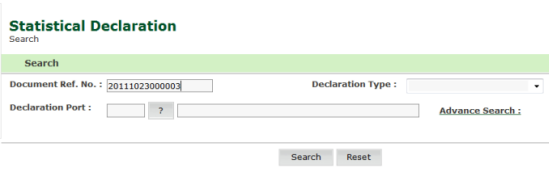
Statistical Declaration -Search page
2. Enter the Document Ref. No.
3. Click Search.
|
Note: If you do not know have the Document Re No, please click on the “Advance Search” link. |
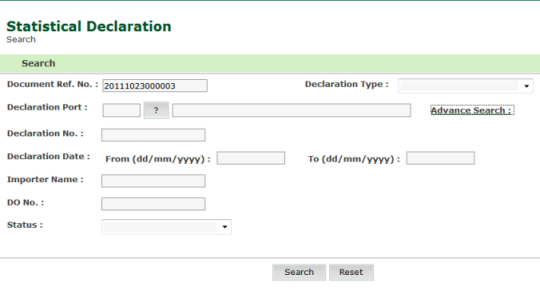
Statistical Declaration -Advanced Search page
4. Enter information in the search criteria fields.
| Field | Description |
| Document Ref No |
Enter the document reference number. |
|
Declaration Port |
Select the declaration port using the selection
|
|
Declaration Type |
Enter the Import/Export from Non GCC Origin and/or GCC Origin, Transit Declaration Number. |
| Declaration Date |
Enter the date or select the date using the calendar |
|
DO No |
Enter the delivery order number. |
|
Status |
Select the status of the declaration from the drop down list.
|
5. Click Search. The Search Result page is displayed.
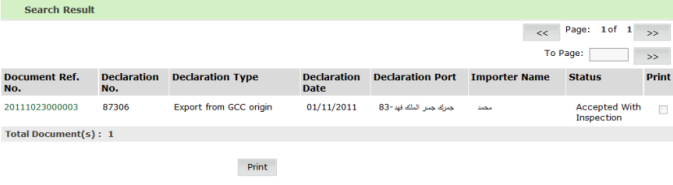
Statistical Declaration -Search Result page
6. Click the Document Ref. No. to view declaration details.
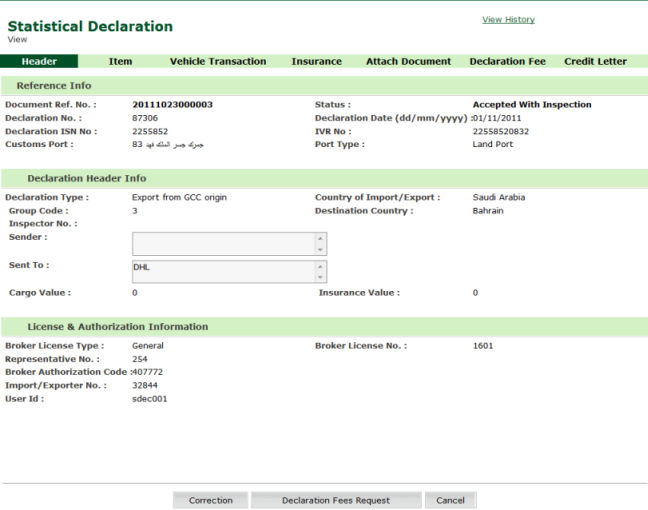
Statistical Declaration View Page
|
NOTE: User can only view the details in the view mode. To edit current declaration, click Edit button. This will bring user to the edit screen which is the same as create screen. |
| Copyright SaudiEDI - 2012 |

 icon.
icon.