

|
|
|
|
|
This option is used to add the Exemption to the items in Import Declaration. If the Item duty type is set as Exemption, Exemption information can be added.
To create exemption details
1. Open the Exemption page. (SAUDIEDI>>Import Declaration>>Create>>Item>>Exemption)
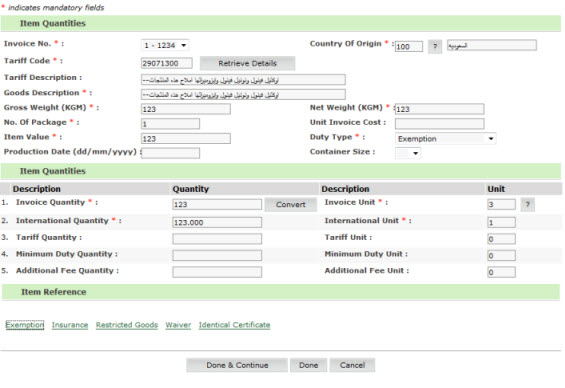
Import Declaration- Exemption View Page
2. C lick Exemption, to add the Exemption to the Item.
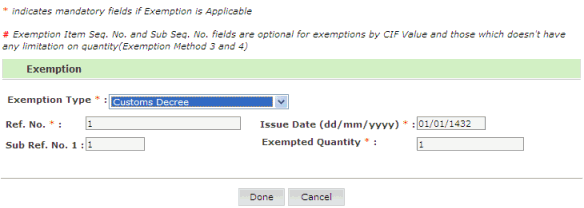
Import Declaration- Exemption Create Page
3. Enter the information in the search fields.
| Field | Description |
|
Exemption Type:
|
Select the exemption type from the drop down list and the necessary fields will be shown for input. Types of Exemption
1. Exemption based on decree or law by Customs. 2. Commercial/Industrial exemption 3. Royal exemption 4. Governmental exemption 5. Gulf Council Countries (Factories) 6. Diplomatic exemption 7. Bi-lateral agreement 8. Exempted from another port 9. Arab countries agreement 10. Foreign Airlines 11. Gulf Countries Council (Vegetarian/Meat/Natural products) 12. GCC |
|
Ref No
|
Select the Exemption Reference number. To select, click |
|
Issue Date |
Exemption Issue Date |
| Sub Ref No. 1 |
Enter Exemption sub reference number 1 |
|
Exempted Quantity |
Enter the exempted quantity. |
4. Click Done, item quantities screen is displayed.
Item Quantities Page
5. Click Done, exemption is added to the item list.
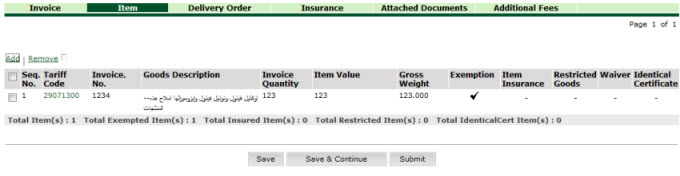
Exemption Added page
|
Back to: |
| Copyright SaudiEDI - 2012 |
 button.