

|
|
|
|
|
This option is used to add the Insurance to the items in Import Declaration. If the Item duty type is set as Insurance, Insurance information can be added.
To add insurance details
1. Open the Item page. (SAUDIEDI >> Import Declaration >> Create>>Item>>Insurance)
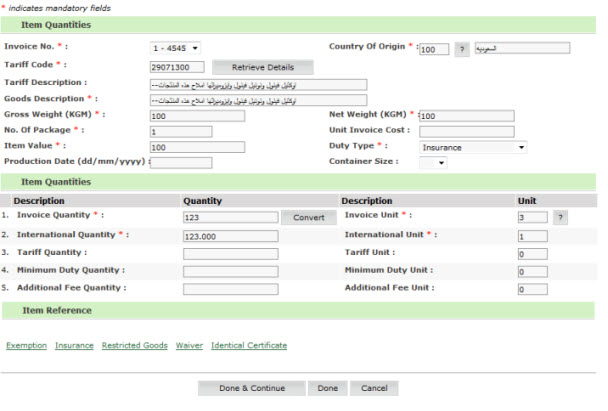
Import Declaration- Insurance Page
2. Click Insurance, insurance create page is displayed.

Insurance Create Page
|
NOTE: For Insurance Type ‘Temporary Entry’ the insurance reason is mandatory and additional letter info can be added by clicking on the Insurance Letter Info hyper link. |
3. Select the insurance type from the drop down list.
4. Clink Insurance Letter Info link, the Insurance Letter details screen is displayed.
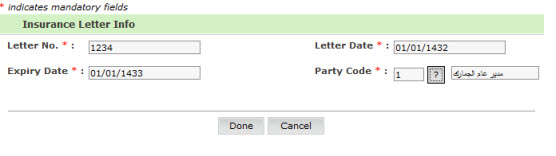
Insurance Letter Info Page
5. Enter the field values.
| Field | Description |
| Letter No | Enter the Insurance letter number |
| Letter Date | Enter the start date of the insurance letter |
| Expiry Date | Enter the end date of the |
|
Party Code |
Enter the party code using the  button button |
6. Click Done. Insurance letter is added to the list.
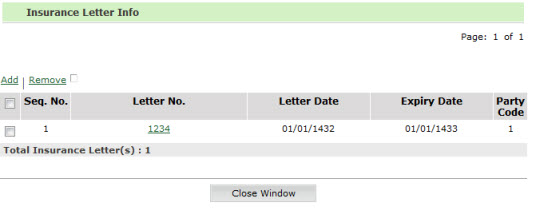
Insurance Letter Info Added Page
7. Click Close Window, item quantities screen is displayed.
Item Quantities page
8. Click Done, insurance is added to the item list.
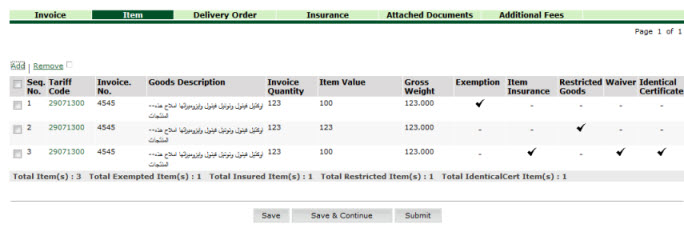
Item Insurance Added page
|
Back to:
|
| Copyright SaudiEDI - 2012 |