

|
|
The Item section allows you to add Item(s) details of statistical declaration. To access the Item section, click on the “Item” tab as illustrated in the image below.
To add item details
1. Open the Item Create Page.(SAUDIEDI>> Statistical Declaration>> Create>> Item)
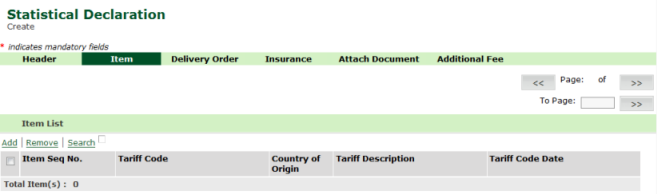
Create Item page
2. Click Item tab.
3. Click on Add link, Item Header page is displayed.
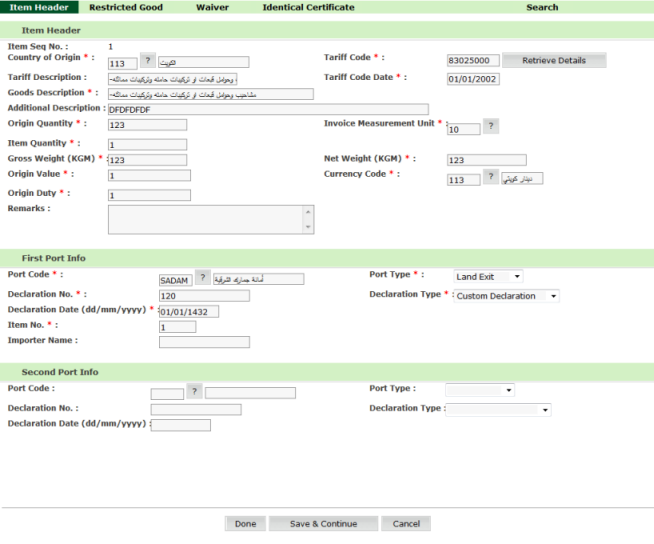
Item Header page
4. Enter
information in the item header fields.
| Field | Description | |
| Item Seq No | Enter the Internal system item sequence number generated when saved. | |
Country of Origin |
Select
the Country of Origin using the selection |
|
Tariff Code |
Enter the Tariff code of the imported or exported goods.
|
|
| Tariff Description | Enter the description of the Tariff code. | |
Tariff Date |
Enter the Tariff Date. |
|
Goods Description |
Enter the description of the goods. |
|
| Additional Description | Enter the Additional Goods Description. | |
Invoice Measurement Unit |
Enter the invoice measurement unit. |
|
Origin Quantity |
The item origin quantity in invoice measurement unit. |
|
| Gross Weight | Gross
weight of the goods.
|
|
Origin Value |
Enter the Origin Cost. |
|
Item Cost |
Enter the item Cost. |
|
| Currency Code | Currency Code. | |
Origin Duty |
Duty already paid. |
|
Remarks |
Remarks. |
|
First Port Type |
Select the port type from the drop down list. |
|
First Port Code |
First Port Code. |
|
First Declaration Type |
First Declaration Type. | |
First Declaration No |
First Declaration No. |
|
First Declaration Date |
Enter the Declaration Date in first declaration. |
|
Item No |
Item Sequence No. in first Declaration. |
|
First Importer Name |
Enter the Importer Name. |
|
Second Port Type |
Second Port Type. |
|
Second Port Code |
Second Port Code. |
|
Second Declaration Type |
Second Declaration Type. |
|
Second Declaration No |
Second Declaration No. |
|
Second Declaration Date |
Second Declaration Date. |
Related Topics: Back To: Creating Statistical Declaration Details
|
| Copyright SaudiEDI - 2012 |
