

|
|
This option allows the user to create statistical declaration for sea port using the SANAM application.
To create statistical declaration header details for sea port
1. Open the Create page. (SAUDIEDI >>Statistical Declaration >> Create)
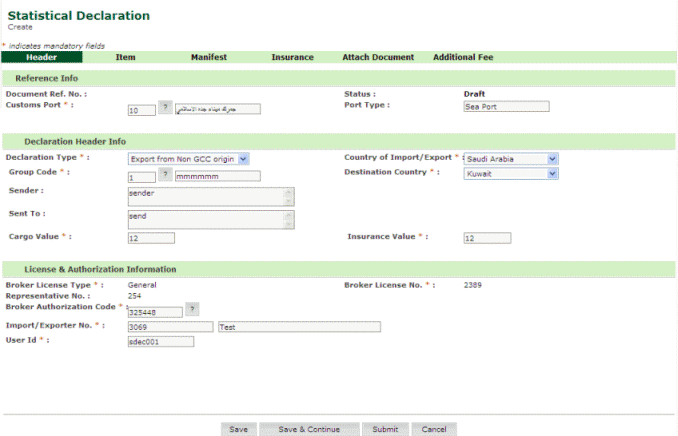
Statistical Declaration-Create Page
2. Enter information in the header fields.
| Field | Description |
| Doc Ref No. | Document Reference Number assigned by the system after the declaration creation. |
| Customs Port | Select
the customs port where the registration is filed. To select the
customs port click  button. button. |
| Status | Status Draft or Sent or Accepted with Inspection. |
| Port Type | Port Type Will be automatically filled in after Customs Port is entered. |
| Declaration Header Info Section | |
Declaration Type
|
Enter the declaration type from the drop down list . For example: Import/Export from Non GCC Origin and/or GCC Origin, Transit |
Country of Import / Export |
Select the Country from the drop down list. For Example: Saudi Arabia or other GCC Countries. |
Group Code |
Enter the Customs Inspection group Code. |
Destination Country |
Select the destination country Saudi Arabia or other GCC Countries. |
Sender |
Enter the Sender’s information details. |
Sent to |
Enter the Receiver’s Information details. |
Cargo Value |
Enter the Cargo value. |
Insurance Value |
Enter the insurance value. |
Transit Owner Type |
Transit Owner Information.
|
| Licence & Authorization Information section | |
Broker Licence Type |
Enter the Broker Licence Type General or Government Broker. |
Broker Licence No |
Enter the Custom Broker licence number.
|
Representative No |
Enter the Custom Broker’s Representative number. |
Broker Authorization Code |
Enter the authorization code based on the agreement between the Intermediary and the Custom Broker.
|
Importer Authorization Code |
Enter the authorization code based on the agreement between the original Importer and Intermediary. |
Importer / Exporter No |
Importer / Exporter number. |
User Id |
Enter the Current Logon User Id. |
3. Click Save.
Related Topics: Creating Attach Document Details Creating Additional Fee Details Back To: Creating Statistical Declaration Details
|
| Copyright SaudiEDI - 2012 |